Michigan Residential Database is a public records platform that may display personal information such as your name, address, and property details.
If you want to protect your privacy, opting out of this database is an important step.
In this guide, you’ll learn:
- What Michigan Residential Database is
- Why your data appears there
- Step-by-step instructions to opt out
- How to prevent your data from appearing again
👉 You’ll also learn how to verify websites and protect your personal data online.
📌 Quick Summary
- Michigan Residential Database collects and displays public personal data
- You can remove your information by submitting an opt-out request
- The process usually takes a few days to complete
- Regular monitoring is required to keep your data private
👉 Follow the steps below to remove your personal information safely.
Table of Contents
Verify Before You Share Personal Information
Before submitting your personal details on any website, make sure the platform is legitimate.
- 🔎 Check who owns the website → Web Hosting Checker
- 🌐 Analyze domain details → DNS Lookup Tool
👉 This helps you avoid fake or phishing websites pretending to offer opt-out services.
👉 Always verify a website before submitting your personal information to avoid scams.
What is Michigan Residential Database?
Michigan Residential Database is an online platform that aggregates publicly available records such as property ownership details, addresses, and related information.
While this data is often legally collected, it can raise privacy concerns because it is easily accessible online.
Many people choose to opt out to reduce their digital footprint and prevent misuse of their personal information.
Why You May Want to Opt Out
- Your personal data is publicly visible
- Risk of identity theft or fraud
- Increased spam or unwanted contact
- Privacy concerns from data aggregation
👉 Removing your data helps reduce these risks.
How to Remove Your Information from Michigan Residential Database
Follow these steps carefully to remove your information from the Michigan Residential Database:
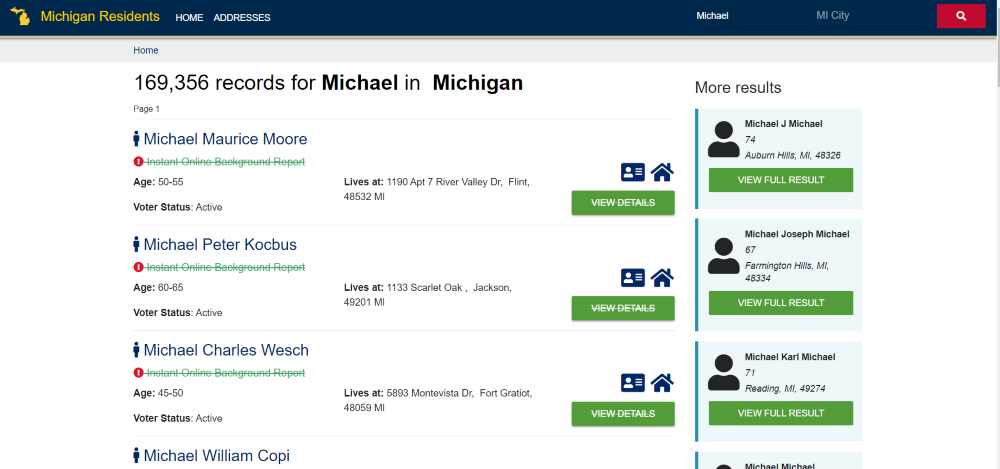
- STEP 1: Visit the Michigan Residential Database Website: Go to http://www.michiganresidentdatabase.com and search for your record using your name or address.

- STEP 2: Locate Your Listing: Once you find your record, click on “View Details” to access the full listing.
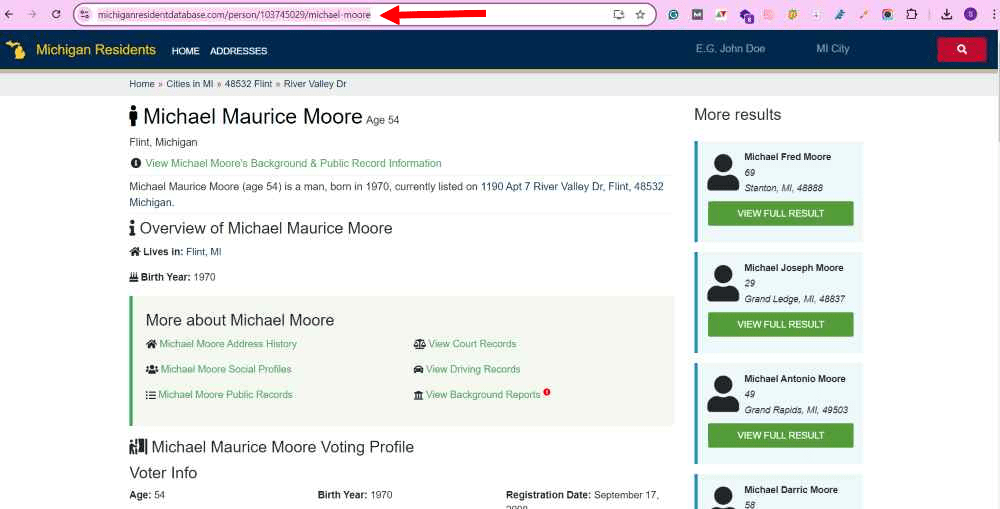
- STEP 3: Copy the URL: Copy the URL of your record from the browser’s address bar. This URL is necessary for the opt-out process.
- STEP 4: Go to the Opt-Out Page: Visit the opt-out page at https://www.michiganresidentdatabase.com/opt-out.

- STEP 5: Submit the URL: Paste the URL you copied into the designated field on the opt-out form.
- STEP 6: Enter Your Details: Fill in your full name exactly as it appears in the listing and provide your email address. In the “reason” field, you can mention “privacy concerns.”
- STEP 7: Verify Your Request: Place a checkmark next to the statement “I hereby certify that I am this person” to confirm your identity.
- STEP 8: Submit the Request: Click “Submit” to complete your opt-out request. You should receive a confirmation email once your request is processed.
👉 If your request is not processed within a few days, follow up or submit again.
Other Websites That Collect Personal Information
The Michigan Residential Database is not the only platform that collects and displays personal information. Several other sites aggregate similar data: Below are step-by-step guides to opt out of similar data broker platforms:
- AnyWho.com – Checkout our data removal guide on AnyWho Opt Out.
- OfficialUSA.com– Checkout OfficialUsa Opt Out Guide.
- Search Public Records – Checkout how to opt-out from Searchpublicrecords.com.
- PeopleSearch.com – Checkout our simple guide to peoplesearch.com opt out.
- Voterrecords.com–Checkout our simple guide to voterrecords.com opt out.
- Blockshopper.com–Checkout Blockshopper Opt Out: Your Privacy Matters.
How to Protect Your Personal Data Online
After opting out, take these steps:
- Avoid sharing personal information on unknown websites
- Use strong passwords and enable 2FA
- Regularly search your name online to check exposure
- Opt out from multiple data broker websites
👉 For additional privacy protection, review our guides on PeopleSearch, AnyWho, PeopleLooker, and VoterRecords to remove personal information from other public record websites.
How Long Does Michigan Residential Database Take to Remove Information?
Most opt-out requests are processed within a few days, although processing times can vary. It is recommended to revisit your listing after a week to confirm that your information has been removed successfully.
Can Your Information Reappear After Removal?
Yes. Michigan Residential Database may update its records using publicly available information. Even after a successful opt-out request, your information may reappear if new records become available.
Frequently Asked Questions
Is Michigan Residential Database legal?
Unfortunately, there is no universal opt-out process. Each platform requires individual opt-out requests.
Is there a fee for opting out of the Michigan Residential Database?
Yes, it collects publicly available data, but you have the right to opt out.
How long does the opt-out process take?
The time varies, but you should expect confirmation within a few weeks. Follow up if necessary.
Can my data appear again after removal?
Yes, if data is re-collected from public records, it may reappear.
Do I need an account to opt out of Michigan Residential Database?
No. Most users can complete the opt-out process without creating an account.
Why is my information listed on Michigan Residential Database?
The platform gathers information from publicly available records and other legally accessible data sources.
How can I protect my data permanently?
Regular monitoring and opting out from multiple data broker sites is required.
Stay Safe While Removing Your Data
Before entering personal details on any website, always verify its authenticity.
- Check who owns the website
- Confirm it is the official opt-out page
- Avoid sharing sensitive information on unknown platforms
👉 Use our Web Hosting Checker and DNS tools to ensure the platform is safe and legitimate.
👉 Learn how to protect your personal data in our complete online privacy guide.
👉 Also be aware of scams like digital arrest that misuse personal information and create fake threats.
This guide is based on publicly available data privacy practices and real-world opt-out processes used across multiple data broker platforms.