OfficialUSA.com is a data broker platform that collects and displays personal information such as names, addresses, and public records.
If your information is listed, it can raise privacy concerns and increase the risk of misuse.
In this guide, you’ll learn:
- What OfficialUSA
- Why your data appears there
- Step-by-step instructions to opt out
- How to protect your personal data
👉 We’ll also show how to verify websites before submitting your information.
📌 Quick Summary
- OfficialUSA collects and displays publicly available personal data
- You can opt out by submitting a removal request
- The process may take a few days for confirmation
- Regular monitoring is required to maintain privacy
👉 Follow the steps below to remove your personal information safely.
Table of Contents
Verify Before You Submit Your Information
Before entering personal details on any opt-out page, verify that the website is legitimate.
- 🔎 Check website ownership → Web Hosting Checker
- 🌐 Analyze domain details → DNS Lookup Tool
👉 This helps you identify whether a website offering opt-out services is legitimate or potentially unsafe.
What is OfficialUSA.com?
OfficialUSA.com like multitudinous data brokers is like a huge hub where anyone can find public records and personal information. Seems beneficial, right? But it’s also a privacy hazard. It gathers information from multiple sources like public records, government databases, and online references, which can be retrieved by anyone within the web posing threat to individuals. It works by trading this data for economic return.
Our digital footprints when we leave trails of data while using the online tools is used by OfficialUSA.com to have our details. It uses cookies and technical tools to gather information.
But no worries! There’s a way out of this digital maze. Opting out from OfficialUSA.com is possible, and here’s a guide through it. Once you’re out then your data is safe, away from curious glance.
Why You Should Opt Out of OfficialUSA
- Your personal data is publicly visible
- Risk of identity theft or fraud
- Increased spam or unwanted contact
- Privacy concerns from data aggregation
👉 Removing your data helps reduce these risks.
How do OfficialUSA.com utilize your data?
Well, it is a collection of data that has records of people’s personal information. It is focused to find someone’s information or details, to verify and check on them. But at the same time, it is used for trading of information which can be a threat as public records are available with great ease and it can be used by fraudsters for identity theft, spam calls and other malicious purposes.
Step-by-Step Guide to Opting Out (Screenshots)
Follow these steps carefully to remove your information from OfficialUSA:
STEP 1) Visit OfficialUSA.com official website: –
Firstly, go to the official website http://www.officialusa.com

STEP 2) Search your name: –
Enter you name in the search bar to find your details.
A list of names will appear from there select your full name.

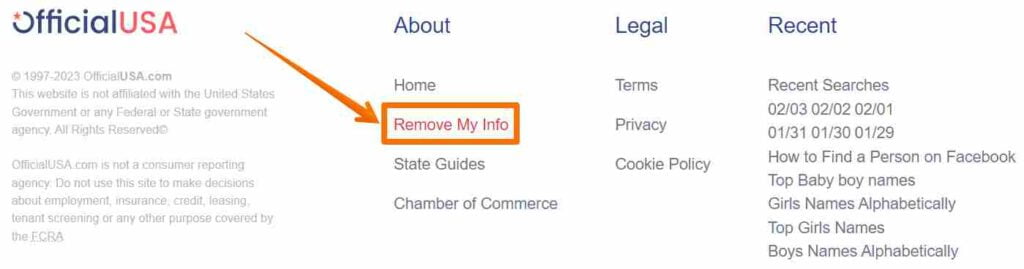
STEP 3) Find your details and then select “Remove My Info”: –
Select the record that aligns with your full name and information.
When you see your details then go to the bottom of the page and click on ‘Remove My Info’ option.
STEP 4) Fill the removal request form: –
Enter your email address and full name. If you don’t see an email address create a new one that does not display your personal information for the removal request form. Use the same email and name listed in the information you saw.
Enter the details then enter URL of the page where you saw your information.

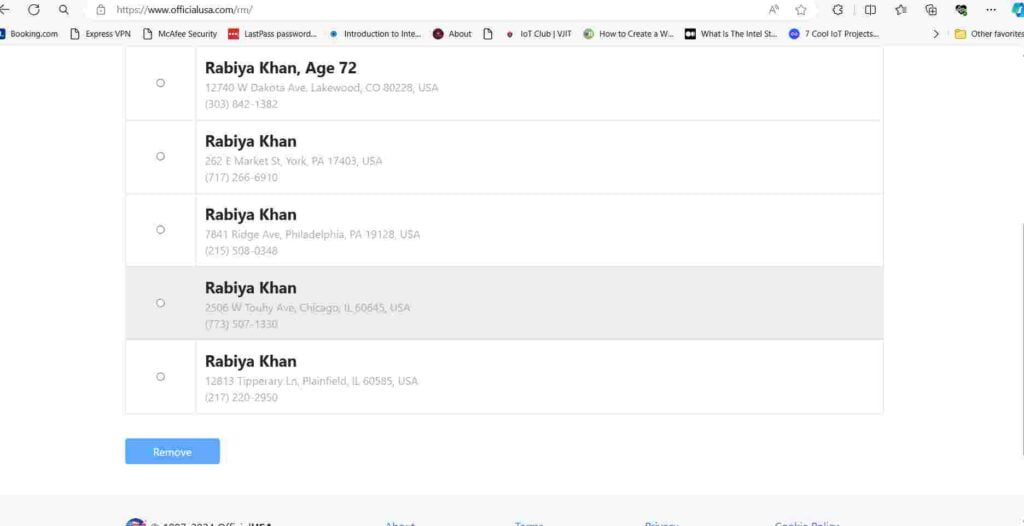
STEP 5) Select your data and click ‘Remove’: –
A list of similar records will appear on the next page select your record.
Click on ‘Remove’ button at the bottom of the page after selecting your record. The team will remove the data in a few days.
It would probably take around a week or two for data removal. It may still take some more time, for confirmation of your data removal search your information on the platform and contact support@officialusa.com.
Examples of Platforms Aggregating Personal Data
In addition to OfficialUSA.com, several other platforms aggregate personal data, Several other sites aggregate similar data: Below are our step-by-step guides to opt out of similar data broker platforms:
- Anywho opt out remove listing
- SearchPublicRecords opt out
- Peoplesearch.com opt out
- VoterRecords.com opt out
- How to opt out of Blockshopper
- How to opt out of Michigan Residential
How to Protect Your Personal Data Online
After opting out:
- Avoid sharing personal information on unknown websites
- Use strong passwords and enable 2FA
- Regularly check where your data appears online
- Opt out from multiple data broker platforms
👉 Privacy protection is an ongoing process.
Frequently Asked Questions
What is OfficialUSA.com?
OfficialUSA is a data broker platform that aggregates publicly available records.
Is it safe to share personal information on OfficialUSA?
You should be cautious and only use official opt-out pages.
How long does the opt-out process take?
It usually takes a few days depending on verification.
Can my data reappear after removal?
Yes, if data is re-collected from public records.
Is opting out free?
Most opt-out processes are free.
Stay Safe While Removing Your Data
Before submitting personal information, always verify the website.
- Check if it is the official platform
- Avoid sharing sensitive data on unknown sites
👉 Use our Web Hosting Checker and DNS tools to ensure the platform is safe and legitimate.
👉 Learn how to protect your personal data in our online privacy guide.
👉 Stay aware of scams like digital arrest that misuse personal information.
This guide is based on publicly available data privacy practices and real-world opt-out processes across multiple data broker platforms.